Plans with ChatGPT, Claude or Gemini · Beta
AI workout generator: your plan from ChatGPT, Claude or Gemini, in the app.
Your own AI builds the plan with you. It asks one thing at a time, like a first session with a trainer: what you're after, your week, your gym, anything that hurts. Then it sends the plan to Gym Commitment on your phone, ready to follow. You set it up once, in three steps. It's new and in beta, so tell us what feels off.
Get your code
Open Gym Commitment on your phone. Go to Plans, tap With your AI, then Connect an assistant. The six-character code is on that screen.
Add it to your assistant
Add Gym Commitment as a connector in Claude, a plugin in ChatGPT, or a custom app in Gemini, using the address below. Others work too. When it asks you to sign in, type the code from your phone. That's the whole sign-in.
Ask for your plan
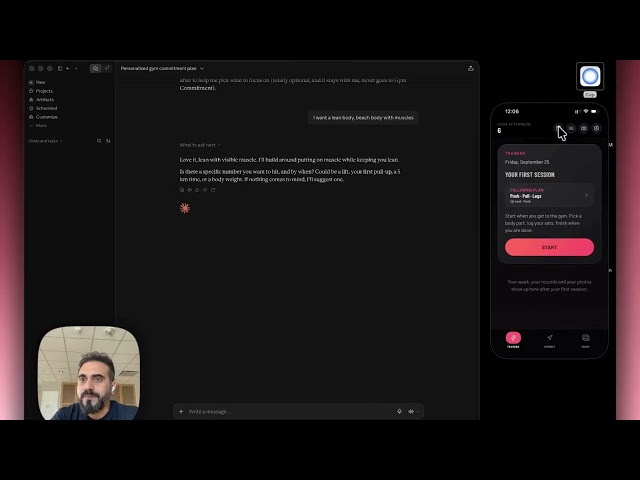
Say the line below, or anything with Gym Commitment in it. It asks you one thing at a time, shows you the plan, and sends it. Your phone buzzes. Open it, save it, follow it.
Copy this address. You paste it in the next step.
https://gym-ai.gymcommitment.workers.dev/mcp- Open Claude on the web or the desktop app. An account without a subscription works too.
- Open Settings, then Connectors, then Add custom connector.
- Name it Gym Commitment, paste the address, and tap Add.
- A sign-in window opens and asks for a code. Type the code from your phone (Plans, With your AI).
- In a chat, tap the plus button, choose Connectors, and switch Gym Commitment on. Now ask for your plan.
Once it's added on the web, it works in the Claude app on your phone as well.

Copy this address. You paste it in the next step.
https://gym-ai.gymcommitment.workers.dev/mcp- Open ChatGPT on the web, at chatgpt.com. This needs a Plus plan or higher.
- Open Settings, then Plugins or Security and login, and switch on Developer mode.
- Still in Plugins, tap the plus button. In the New Plugin window, skip the upload box and tap Create MCP App.
- Name it Gym Commitment. Paste the address in the Server URL box under Connection, not in Description. Leave Authentication on OAuth, tick I understand and want to continue, and tap Create.
- A sign-in window opens and asks for a code. Type the code from your phone (Plans, With your AI).
- In a chat, tap the plus button and pick Gym Commitment. Now ask for your plan.
ChatGPT calls these Plugins now, and adding one works on the web only.
Copy this address. You paste it in the next step.
https://gym-ai.gymcommitment.workers.dev/mcp- Open Gemini on the web, at gemini.google.com, with a personal Google account. For now this works in the US, in English.
- Open Settings, then Connected Apps. If you don't see it, it's under Personal Intelligence.
- Under Custom apps, tap Add a custom app, paste the address, and tap Next.
- A sign-in window opens and asks for a code. Type the code from your phone (Plans, With your AI).
- Start a chat and ask for your plan. Say Gym Commitment in it, so Gemini knows to use it.
Add it on the web once, and it works in the Gemini app on your phone too.
Copy this address. You paste it in the next step.
https://gym-ai.gymcommitment.workers.dev/mcp- In its settings, look for Connectors, Apps or MCP servers, and choose to add a custom one by its address.
- Paste the address. If it asks how to sign in, pick OAuth. If it asks for a transport, pick Streamable HTTP.
- A sign-in window opens and asks for a code. Type the code from your phone (Plans, With your AI).
- Switch it on in a chat if your assistant asks you to, then ask for your plan.
- Perplexity (Pro): Settings, Connectors, add a custom connector. Mistral Vibe: Connectors, Add Connector, Custom MCP Connector, and name it GymCommitment, with no space.
Not sure where it is? Ask your assistant: "How do I add a custom MCP server by its URL?"
Let's build my gym plan in Gym Commitment. Ask me whatever you need first.
Build me a 4-day plan in Gym Commitment. Dumbbells and a pull-up bar at home, and my left shoulder hates overhead presses.
Here's a photo of my gym. Make me a 3-day plan in Gym Commitment. I want to get stronger, and I'm a beginner.
Give me a 30-minute full body plan in Gym Commitment I can do at lunch, twice a week.
Generate your workout plan
Pick what fits you. We write the prompt, and your own assistant builds the plan with you.
What a good plan from your AI looks like
Your AI is good at structure. Before you follow the plan it writes, check it against these five points.
- Each muscle you care about gets about 10 to 20 hard sets a week.
- The big lifts come first in each session, while you are fresh.
- Every exercise has a rep range, and a rule for when to add weight.
- Rest fits the work: longer after heavy sets, shorter after light ones.
- Every session fits your time, with exercises your gym actually has.
Not sure what weight to start with? The one rep max calculator turns any hard set into training weights for 1 to 12 reps. For the reasons behind these checks, see how many exercises per workout, how long to rest between sets and the best compound exercises.
More prompts and a full checklist: ChatGPT workout plan guide
AI workout plan FAQ
What is a connector?
A way to let your assistant use an app. ChatGPT calls it a plugin, Gemini a custom app. You add it once, it stays. Here it lets your assistant look up exercises from the app and send a finished plan to your phone. It can also read a plan you ask it to change, or your training for a report (your last 12 weeks, a month, a year or your whole log) if you choose to share it.
Where is my code?
In the app: Plans, With your AI, then Connect an assistant. The code is on that screen. It works once, within ten minutes.
What does Gym Commitment keep?
The plans your assistant sends, for 30 days, and a record that your phone is connected. If you ask for a change, we hold the plan text for three hours at most. If you share your training for a report, we hold it for 24 hours at most, and the finished report for 7 days. We never keep what you say in the chat. Your chat, and any photo you share with it, stays with your assistant. The privacy policy has the full list.
How do I disconnect, or connect again?
In the app, open the AI tab, tap your assistant, then Disconnect. It stops your AI from reaching your phone right away, and plans already on your phone stay yours. To connect again, or to remove Gym Commitment from your AI as well, ask your AI how to do it.
Do I need Pro to connect my assistant?
No. Any plan connects, with or without Gym Commitment Pro, though some AI features in the app work only a few times before they need Pro. Claude lets you add one connector without a subscription. ChatGPT asks for Plus, Perplexity for its own Pro, and Gemini works for now in the US only.
Which assistants work?
Any assistant that lets you add a connector by its address, also called a remote MCP server. We try every change in Claude and ChatGPT. Gemini works too. Perplexity and Mistral Vibe follow the same standard and should work the same way. If yours doesn't, tell us which one.
What if the notification doesn't arrive?
The plan is still there. Open the app: it is on Home until you open it, and under Plans, With your AI. Ask your assistant for the link and it opens the same plan.
Do I need a Gym Commitment account to use the AI workout generator?
No. The generator above writes the prompt for you. Paste it into any assistant and you get a plan. For the plan to land in Gym Commitment, connect your assistant once; Claude lets you add one connector without a subscription.
Can ChatGPT make a good workout plan?
Yes, if you tell it your goal, your days, your equipment and anything that hurts. Our ChatGPT workout plan guide has prompts that work and a checklist for the plan it writes.
Get the app first. The code is inside it.